
Competitor analysis
Find the keywords your competitors rank for and you don't
Compare a client's site with up to 4 competitors and see the keywords they rank for on Google that the client doesn't, the ones they share listed first.
14-day trial with Agency plan limits · No credit card
The basics
What a keyword gap tells you
A keyword gap is the set of searches your competitors rank for and your client doesn't. It's one of the quickest ways to find demand a site is missing, because a competitor has already shown that Google will rank a page for each of those searches in your market.
The most useful gaps are shared. A keyword one competitor ranks for may be a quirk of that site's history. A keyword that three or four direct competitors all rank for is usually a topic the market expects every business in the category to cover.
Not every gap is worth closing. Some keywords belong to a competitor's brand, a product your client doesn't sell or a place it doesn't serve. Volume, difficulty and intent help you sort the rest: commercial and transactional searches tend to sit closer to a sale, informational ones closer to early research.
Treat the list as raw material for a content plan. Group the keywords you keep, look at what already ranks for them, and decide whether an existing page can cover them or a new one is needed.
In RankTwice
How it works
- 01
Pick a client or any site
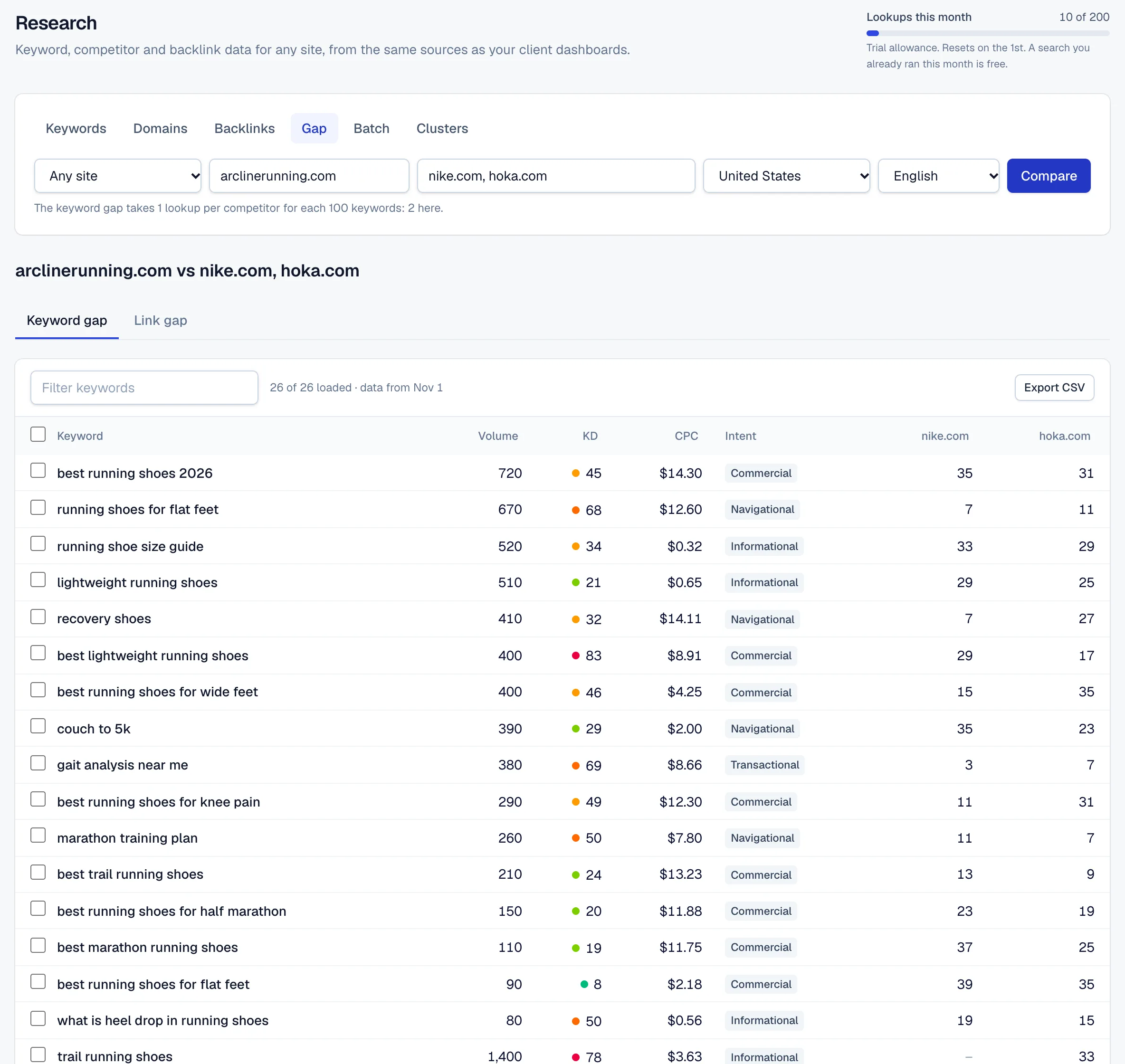
In Research, open the keyword gap and pick a client: its domain, its first 4 competitors, its country and its language are filled in. Or enter any site and up to 4 competitors by hand.
- 02
Each competitor is compared with the site
For each competitor, RankTwice pulls the organic Google keywords it ranks for in that country and language where your site doesn't rank, biggest search volume first.
- 03
The lists are merged
The competitors' lists become one table. Keywords more competitors share come first, then the ones with the most searches.
- 04
Act on the rows
Sort, filter or export the table to CSV, load 100 more rows at a time up to 1,000, open any keyword in the keyword explorer, or pick rows and add them to a project's daily rank tracking.
- 05
Kept for the client's report
A gap run from a client is saved with that client. Its monthly report then lists the top keywords from the latest run, with their search volumes, under Opportunities.
Reading the screen
How to read it
- Volume
- Average monthly Google searches in the country you chose.
- KD
- Keyword difficulty from 0 to 100: how hard it is to reach the top 10, labeled from Easy to Super hard.
- CPC and intent
- What advertisers pay per click in Google Ads, in US dollars, and whether the search is informational, navigational, commercial or transactional. A high CPC is a sign that the search tends to lead to sales.
- Competitor columns
- Each competitor's Google position for the keyword. A dash means no position for that competitor in this data. The more columns with a number, the more competitors share the gap.
- Loaded and dated
- Above the table you see how many rows are loaded out of the total, and the date the data is from.
Putting it to work
What to do with it
Agencies
Run the gap from each client every quarter, keep the shared keywords that fit the client's services, and track them. The report's Opportunities section shows the client what's still open.
Freelancers and consultants
Before a pitch, run the gap for the prospect against its two or three closest rivals. A short list of shared keywords with real search volume makes a concrete proposal.
In-house teams
Plan content with your writers. Shared, high-volume keywords with the right intent become briefs, and tracking them shows when the new pages start to rank.
Plans and limits
Compare plans- Up to 4 competitors per comparison.
- Each page of 100 keywords takes 1 research lookup per competitor. The same comparison again in the same month is free.
- Research lookups a month: 50 on Free, 1,000 on Freelancer, 2,500 on Agency and 5,000 on Agency Pro, and 200 during the trial.
- Paid plans can add 1,000 lookups a month for $39.
FAQ ( 5 )
Questions about keyword gap
How keyword gap works in RankTwice, and what each plan includes.
Where does the keyword data come from?
From a database of Google rankings rather than a live search, so positions and volumes are estimates. A search anyone ran in the last 30 days is served from our cache, and the table shows the date its data is from.
How many lookups does a keyword gap use?
1 lookup per competitor for each page of 100 keywords, so a comparison with 4 competitors takes 4 a page. Running it again in the same month is free, and a search that fails isn't charged.
Does the site have to be a client project?
No. You can compare any site with any competitors. Running it from a client fills in its competitors and market, and keeps the result for its monthly report.
Which countries can I compare in?
Any of the 15 countries and 7 languages we support. Pick the client's own market, since rankings differ from country to country.
Is there a link gap too?
Yes. The same screen has a link gap: sites that link to every competitor you enter but not to your site, strongest first, as outreach prospects.
Related
- FeatureKeyword researchKeywords, domains, backlinks and gaps
- FeatureContent briefsOutlines from the top 10 results
- Rank trackingSERP featuresEach day's top 20 check also records which SERP features Google showed, such as an AI Overview, a local pack or a featured snippet, and which of them show your client.
- AI visibilityCitation gapsCitation gaps are pages the AI answers to your prompts cite that name a competitor and not your client. Each one is a page worth getting your client onto.
Get started
Get started with RankTwice today
Audit a prospect's site now, or add your first client in a few minutes. Rankings and AI checks start within the hour.
14-day trial with Agency plan limits · No credit card