
Local SEO
See where a local client ranks, street by street
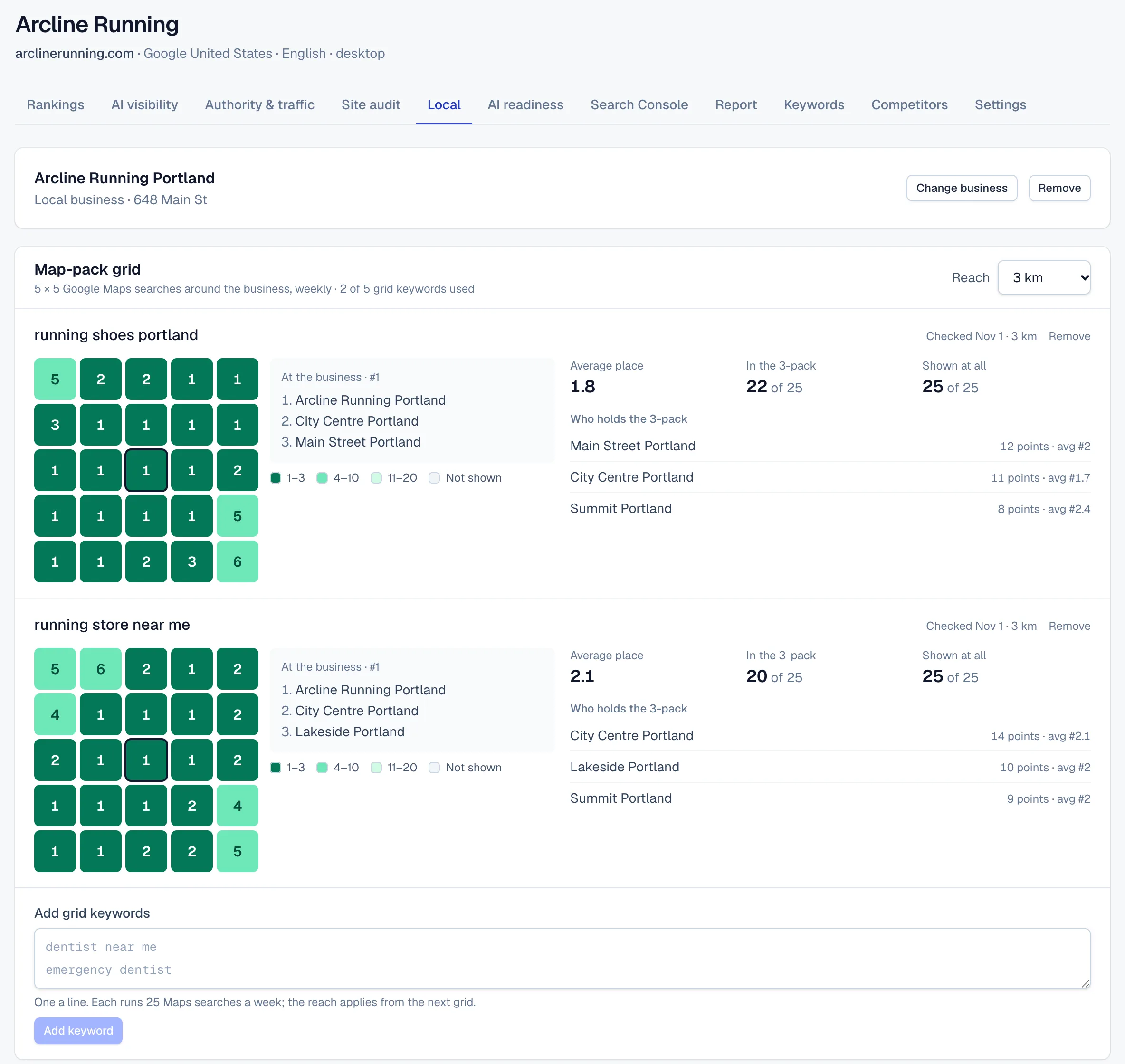
Each grid keyword is searched on Google Maps from 25 points around the business every week, and its place in the results is recorded at each one.
14-day trial with Agency plan limits · No credit card
The basics
Why one local ranking isn't enough
Local results depend on where the searcher is. Someone looking for an emergency plumber two streets from your client's office and someone searching across town can see different businesses on the map. A single rank check from one spot shows only one of those views.
A rank grid runs the same search from many points around the business and records its place at each one. The result reads like a heat map: usually strongest near the business and weaker further out, with patches where a competitor holds the neighborhood.
The top three places matter most. For many local searches, Google's results page shows a pack of three businesses from the map, with ratings and directions, above the organic results. A business in that 3-pack where its customers are searching gets seen; one in eighth place is easy to miss.
The grid is a diagnostic as well as a scorecard. A client that ranks well at the center and fades fast may need more reviews, links or local content to compete further out. A client that's weak even next door usually has a more basic problem, such as the wrong primary category or an incomplete profile.
In RankTwice
How it works
- 01
Pick the client's Google Business Profile
In the project's Local SEO tab, search for the business by name, with the city if it has several branches, and pick it from the Google Maps results. The search uses a research lookup.
- 02
Add the searches that matter
Add grid keywords one a line, such as “dentist near me” or “emergency dentist”. The first grid for each one runs within the hour.
- 03
Set the reach
Choose how far the grid reaches from the business: 1, 2, 3, 5, 8 or 15 km each way, 3 km unless you change it. The 25 points are evenly spaced in a square centered on the business, and a new reach applies from the next grid.
- 04
A Maps search from every point
Every week, each keyword is searched on Google Maps from each point, zoomed in as someone searching nearby would see it. The business's place in the top 20 is recorded, along with the top three businesses at that point.
- 05
Summed up and reported
Each grid gets an average place, compared with the week before, plus a count of points in the 3-pack and a count of points where the business shows at all. The monthly report carries each keyword's average place and 3-pack count.
Reading the screen
How to read it
- Cell colors
- Dark green is a 3-pack place, mid green the rest of the top ten, light green further down to 20, and gray means the business isn't in the top 20 at that point. Every cell also prints its number, and a question mark marks a point that couldn't be read.
- Average place
- The average of the places where the business shows. Lower is better. Points where it doesn’t show are left out, so always read it next to “Shown at all”.
- In the 3-pack
- How many of the 25 points have the business in the top three. This is the figure to grow.
- Shown at all
- How many points have the business anywhere in the top 20 Maps results.
- Who holds the 3-pack
- The businesses that take a top-three place at the most points, with how many points each holds and its average place there. Point at any cell to see the top three at that spot; the outlined center cell is the business itself.
Putting it to work
What to do with it
Agencies
Show local clients where they appear on the map, week by week, and use the rival list to explain who takes the 3-pack where they don't. Start with the two or three searches that bring in calls.
Freelancers and consultants
Set the reach to match the client's real service area, so a plumber who covers the whole city isn't judged on a few blocks and a café isn't judged on the whole city. The grid then makes your local work easy to show.
In-house teams
Run grids on the searches customers use to find your location, and watch whether new reviews, photos and profile fixes widen the area where you're in the 3-pack.
Plans and limits
Compare plans- Grid keywords start on the Freelancer plan: 10 on Freelancer, 50 on Agency and 100 on Agency Pro, across all projects.
- 5 grid keywords during the 14-day trial.
- 25 Google Maps searches per keyword, once a week, reaching 1 to 15 km from the business.
- Over the plan's allowance, the oldest grid keywords keep being checked.
FAQ ( 6 )
Questions about map-pack grid
How map-pack grid works in RankTwice, and what each plan includes.
How is the grid laid out?
5 rows of 5 points, evenly spaced in a square centered on the business. The reach you pick, from 1 to 15 km, is the distance from the business to each edge.
Is this the same as the local pack in rank tracking?
No. Rank tracking records the local pack on the main Google results page once a day, for the project's country or the keyword's own location. The grid searches Google Maps from each point around the business once a week.
Why does the average place leave out points where the client is missing?
A point where the business isn’t shown has no place to average. So the average covers only the points where it shows, and “Shown at all” tells you how many those are. A great average over a handful of points is weaker than a good one across the whole grid.
What happens when a point fails?
It shows a question mark and is left out of the numbers. If more than half of the grid can't be read, the grid is marked as failed and runs again the next week.
Can I change the reach later?
Yes. The new reach applies from the next grid, so note the date when you compare weeks.
What else is in Local SEO?
A profile audit of the client's Google Business Profile with the fixes in order, and its rating and reviews read weekly. From the Agency plan, a new review of 2 stars or fewer raises an alert.
Related
- FeatureLocal SEO5 × 5 map-pack grids and reviews
- Rank trackingSERP featuresEach day's top 20 check also records which SERP features Google showed, such as an AI Overview, a local pack or a featured snippet, and which of them show your client.
- Reports and alertsClient portalEach client gets a private link that opens its latest monthly report under your brand, with no account to create and nothing to export.
Get started
Get started with RankTwice today
Audit a prospect's site now, or add your first client in a few minutes. Rankings and AI checks start within the hour.
14-day trial with Agency plan limits · No credit card