
Reports and alerts
Hear about it the day something changes
Between monthly reports, alerts flag what needs attention: rank drops, changes in who AI answers name, lost links and low reviews, in the app and in one email a day.
14-day trial with Agency plan limits · No credit card
The basics
Why alerts matter between reports
A monthly report tells a client what happened. Alerts tell you while you can still act. A page that falls off page one after a site update, or an AI engine that starts recommending a competitor, is easier to deal with in the first week than the fifth.
Useful alerts are specific and rare. An email for every one-place wobble gets ignored. Alerts worth reading compare each check with the one before, and only fire past a threshold you set.
They bring good news too. A keyword reaching the top three, or an AI engine naming your client for the first time, is a quick win to pass on to the client the same day.
In RankTwice
How it works
- 01
Rankings, after every daily check
A keyword that fell by at least your threshold (3 places unless you change it), dropped out of the top 20 or reached the top three is flagged, compared with its previous check.
- 02
AI answers, after every weekly check
For each prompt and engine, ChatGPT, Perplexity, Gemini and Google AI Overviews, an alert says when the engine stops naming the client, starts naming it, or starts naming a competitor it didn't name before.
- 03
Links and reviews, weekly
When a client's metrics refresh, losing at least 10% of its referring domains (and at least 5) raises an alert. So does a new Google review of 2 stars or fewer.
- 04
In the app, and one email a day
Alerts collect on the Alerts page with the client's name and date. Once a day, everyone who turned alert emails on gets one summary of the new ones.
- 05
Your settings
Owners and admins choose which kinds of alert run and the drop threshold. Each person chooses whether to get the email.
Reading the screen
How to read it
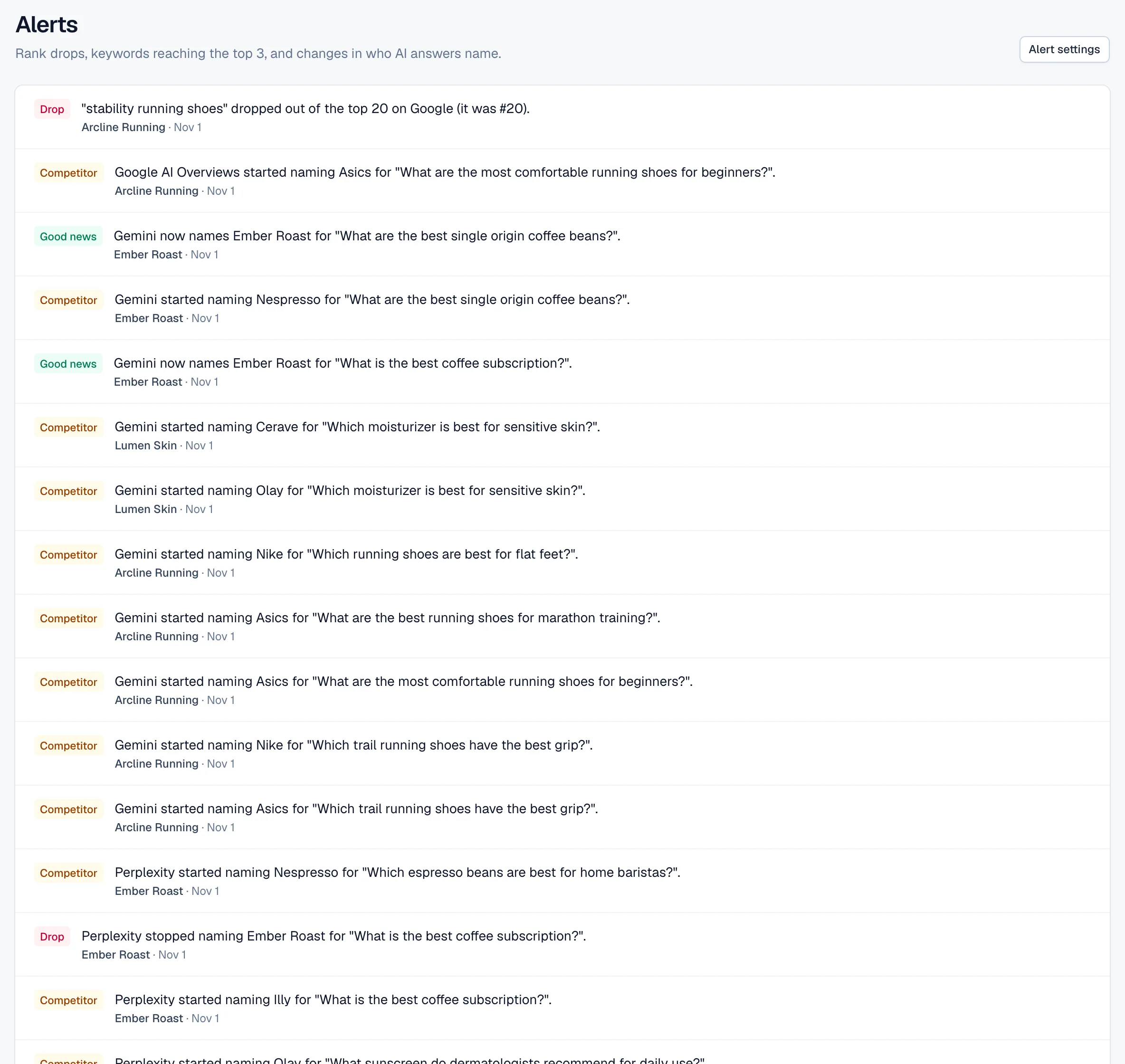
- Drop
- Something to look at: a keyword that fell or left the top 20, an engine that stopped naming the client, lost referring domains or a low review.
- Competitor
- An AI engine named one of your tracked competitors for a prompt where its previous answer didn't.
- Good news
- A keyword reached the top three, or an engine started naming the client.
- Client and date
- Each alert names the client and the day of the check that found it, so one list covers every project in the workspace.
Putting it to work
What to do with it
Agencies
Go through every client from one list each morning. Drops point to pages to check; good news goes straight into a message to the client.
Freelancers and consultants
Spot problems before the client does. Hearing about a drop from you, with the cause and the fix, does more for a retainer than hearing about it from a sales report.
In-house teams
Watch competitors in AI answers. A rival newly named for your main prompts is a cue to read those answers and the sources they cite.
Plans and limits
Compare plans- On the Agency and Agency Pro plans, and during the 14-day trial.
- Rank drop threshold from 1 to 20 places, 3 by default.
- At most one email a day, to each team member who turns alert emails on.
FAQ ( 5 )
Questions about alerts
How alerts works in RankTwice, and what each plan includes.
Which plans include alerts?
Agency and Agency Pro, and every workspace during its 14-day trial. On other plans the Alerts page explains what they'd show.
How do I stop alerts for small moves?
Raise the drop threshold in alert settings. At 5, a keyword has to fall at least five places from one daily check to the next before it's flagged.
Why didn't I get an alert when a keyword slid?
Alerts compare each check with the previous one. A keyword that slips a place or two a day stays under the threshold each time; the 7-day and 30-day columns in the rankings table show slower slides.
When does the email arrive?
Once a day, from 13:00 UTC, listing the alerts found since the last email. A day with no new alerts sends nothing.
Can clients get alerts?
Alert emails go to members of your team who turn them on. Clients see the changes in their monthly report and portal instead.
Related
- Reports and alertsClient portalEach client gets a private link that opens its latest monthly report under your brand, with no account to create and nothing to export.
- Rank trackingSEO share of voiceShare of voice turns each day's Google positions into one number: the share of the clicks on your tracked keywords that your client, and each of up to 5 competitors, is likely to get.
- AI visibilityShare of voiceEvery week, your prompts go to ChatGPT, Perplexity, Gemini and Google AI Overviews. Share of voice shows how the mentions split between your client and up to 5 competitors.
- Keyword researchBacklinksEnter a domain to see the sites linking to it, strongest first, the anchors they use and when each link appeared, with a spam score that flags the ones to look at twice.
Get started
Get started with RankTwice today
Audit a prospect's site now, or add your first client in a few minutes. Rankings and AI checks start within the hour.
14-day trial with Agency plan limits · No credit card