
Keyword research
Size up any website in one search
Enter a domain to see its authority, links and estimated Google traffic with 12 months of history, then the keywords and pages that bring the traffic and the sites it competes with.
14-day trial with Agency plan limits · No credit card
The basics
What a domain overview tells you
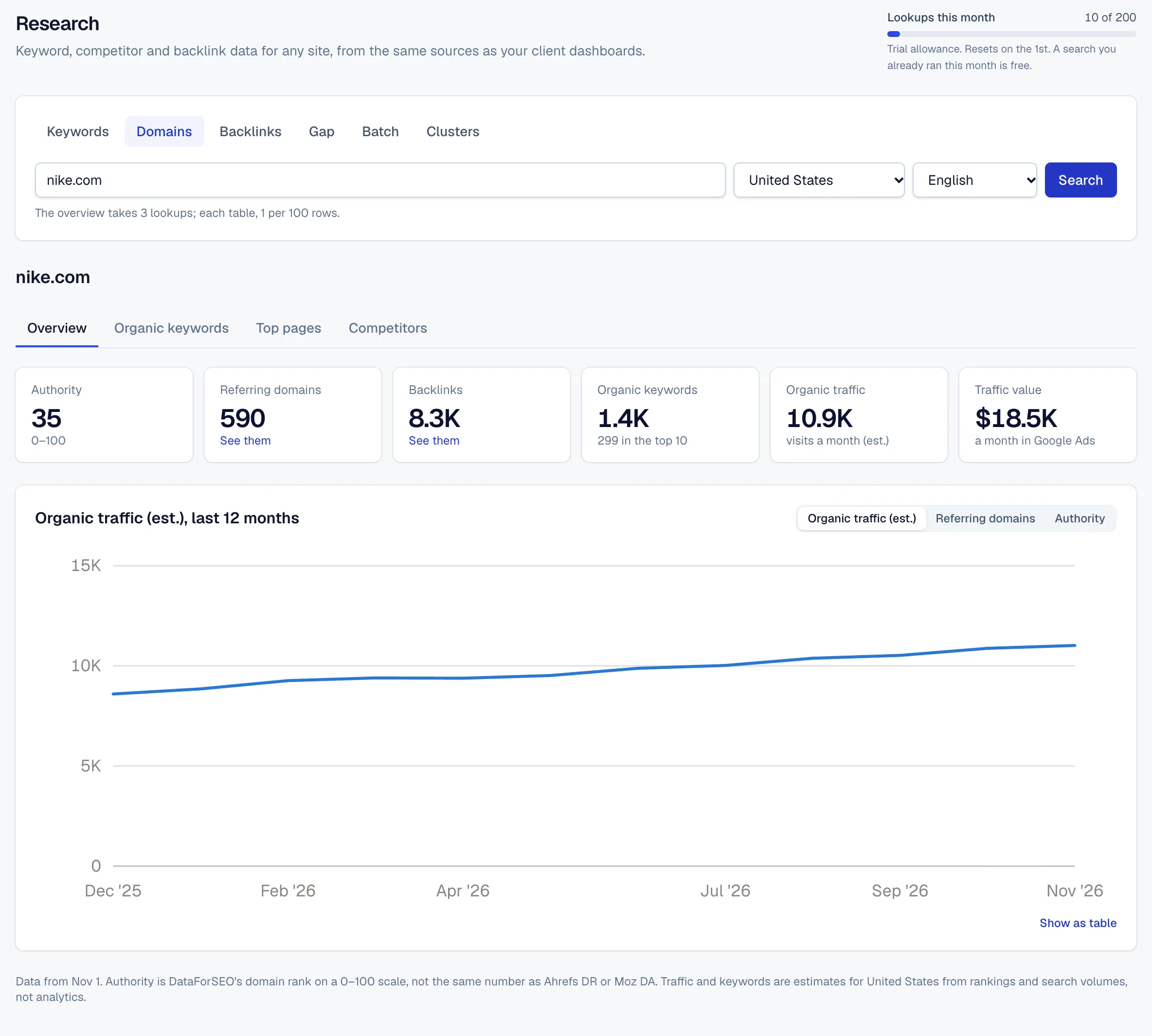
Before you pitch a client, take on a competitor or ask for a link, you want to know how strong the site is in search. A domain overview puts the main signals on one screen: how much of the web links to it, how much search traffic it likely gets and where that traffic comes from.
Traffic here is an estimate, not analytics. It's worked out from the keywords the site ranks for, their search volumes and the share of clicks each position usually gets. That makes any two sites comparable, including ones you'll never have access to, but it won't match the site's own analytics.
The history matters as much as today's numbers. A site whose traffic doubled in six months is doing something worth studying; one whose referring domains keep falling may be losing links it relied on.
The keyword and page lists explain the totals. Often a handful of pages bring most of a site's search traffic, and those are the pages to study, or to beat.
In RankTwice
How it works
- 01
Search a domain
Enter any domain and the country and language to measure it in. Links are counted worldwide; keywords, traffic and competitors are for the market you pick.
- 02
The overview
Authority, referring domains, backlinks, organic keywords with how many are in the top 10, estimated monthly organic traffic and what it would cost in Google Ads, with a chart of the last 12 months.
- 03
Organic keywords and top pages
Every keyword the site ranks for, the ones bringing the most traffic first, with the position, estimated visits and ranking page. Top pages lists the pages that bring the most, with their keywords and how many are in the top 10.
- 04
Competitors
Sites that rank for the same keywords, the most shared first, with their own keywords, traffic and average position on the shared ones. The biggest general sites are left out, so real rivals show.
- 05
One click to backlinks
The referring domains and backlinks figures open the backlink explorer for the same domain, and any competitor opens its own overview.
Reading the screen
How to read it
- Authority
- A 0–100 score of the site's strength from the links pointing to it. It's on its own scale, not the same as other tools' authority scores, so compare sites with each other here rather than across tools.
- Referring domains and backlinks
- Referring domains count the separate sites that link; backlinks count every link. Referring domains are usually the better signal: a hundred links from one site are still one referring domain.
- Organic traffic and its value
- Estimated monthly visits from Google's organic results in the chosen country, and what the same clicks would cost as ads. Use them to compare sites and follow trends, not as visit counts.
- Keywords in the top 10
- How many of the ranking keywords are on page one. A site with many keywords but few in the top 10 has a lot of pages close to bringing traffic.
- History
- Switch the chart between organic traffic, referring domains and authority to see each over the last 12 months.
Putting it to work
What to do with it
Agencies
Check a prospect before the first call, and its competitors too. Authority and traffic side by side set realistic goals before you promise any.
Freelancers and consultants
Study a competitor's top pages. The handful that bring most of its traffic show which topics and page types are worth building for your client.
In-house teams
Keep an eye on the sites you compete with. A rival's traffic jump or a new top page is often the first sign of a campaign you'll want to answer.
Plans and limits
Compare plans- An overview takes 3 research lookups; each page of 100 keywords, pages or competitors takes 1. The same search again in the same month is free.
- Research lookups a month: 50 on Free, 1,000 on Freelancer, 2,500 on Agency and 5,000 on Agency Pro, and 200 during the trial.
- Client projects and their competitors are refreshed automatically, clients every 7 days and competitors every 30, without using lookups.
FAQ ( 5 )
Questions about domain overview
How domain overview works in RankTwice, and what each plan includes.
Is the traffic real?
It's an estimate from rankings and search volumes, worked out the same way for every site. That makes it good for comparing sites and spotting trends; a site's own analytics will show different numbers.
How is authority worked out?
From the links pointing to the site: how many sites link to it and how strong those sites are. It runs from 0 to 100, and the higher a site is, the more it takes to move.
Why don't links change with the country?
A link counts wherever the linking site is, so links are counted worldwide. Keywords, traffic and competitors are for the country and language you pick.
How fresh is the data?
A search anyone ran in the last 30 days is served from our cache; older ones are fetched fresh. The page shows the date its data is from.
Do I need to add a site as a project first?
No. You can look up any domain. Adding a client as a project tracks the same figures for it automatically, with its competitors beside it.
Related
- Keyword researchBacklinksEnter a domain to see the sites linking to it, strongest first, the anchors they use and when each link appeared, with a spam score that flags the ones to look at twice.
- Competitor analysisKeyword gapCompare a client's site with up to 4 competitors and see the keywords they rank for on Google that the client doesn't, the ones they share listed first.
- AI readinessProspect auditsEnter a prospect's website and get a branded audit in about a minute: whether AI crawlers can reach and read it, its authority and traffic, and the fixes in order.
- Keyword researchKeyword ideasEnter a keyword to see its numbers and today's top 10, then matching terms, related searches and questions, each with volume, difficulty and intent.
Get started
Get started with RankTwice today
Audit a prospect's site now, or add your first client in a few minutes. Rankings and AI checks start within the hour.
14-day trial with Agency plan limits · No credit card