
Keyword research
Find the searches worth writing for
Enter a keyword to see its numbers and today's top 10, then matching terms, related searches and questions, each with volume, difficulty and intent.
14-day trial with Agency plan limits · No credit card
The basics
How to judge a keyword idea
Keyword research starts with a seed, a word or phrase your customers might use, and widens it into the searches people actually make. The aim isn't the biggest list. It's the searches where a page from your client could rank and the visitor would be worth having.
Four numbers do most of the sorting. Volume is how many searches a month, on average. Difficulty estimates how hard the top 10 is to break into. Cost per click is what advertisers pay, a rough sign of commercial value. Intent says what the searcher wants: to learn, to find a site, to compare or to buy.
Longer searches are often the better bet. A phrase with a few hundred searches a month and low difficulty can bring more customers than a broad term no new page will rank for, because the searcher has said exactly what they want.
Questions deserve their own list. They show what people want explained, and they make good headings, FAQ entries and articles. Pages that answer a question plainly are also the kind AI answers can quote.
In RankTwice
How it works
- 01
Start with a keyword
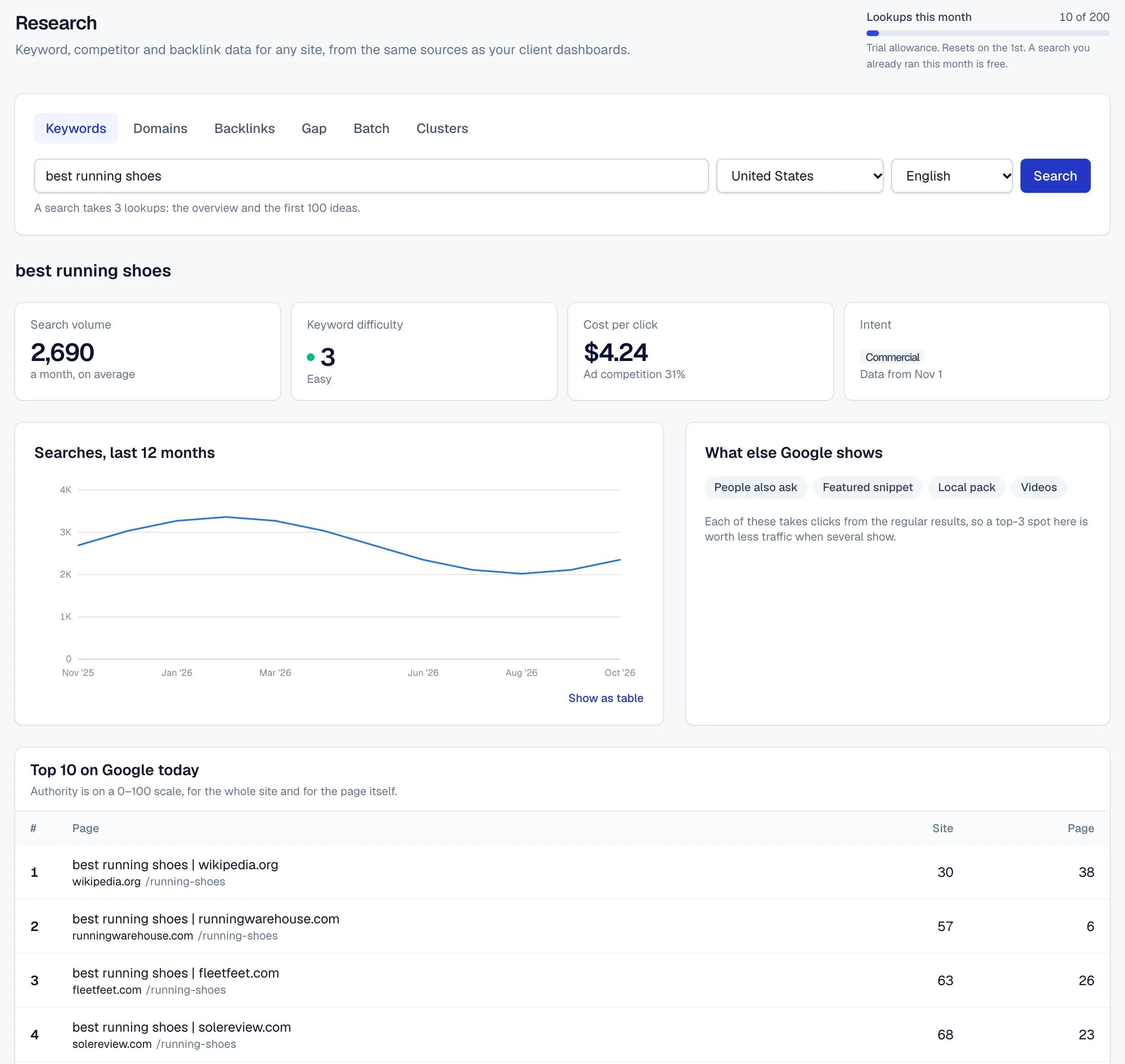
Enter a seed and pick one of 15 countries and 7 languages. The overview shows its volume, difficulty, cost per click, ad competition, intent and monthly trend, the SERP features Google shows for it, and today's top 10 with each result's authority.
- 02
Three lists of ideas
Matching terms are searches that contain your keyword. Related keywords are searches people make around the same topic, even without your words. Questions are matching searches phrased as a question, starting with words like how, what, why or which.
- 03
Sort, filter and export
Each list starts with the most searched ideas, 100 at a time, up to 1,000. Filter by any word, sort by any column and export what you've loaded as CSV.
- 04
Track the ones you keep
Tick the ideas you want and add them to a client's rank tracking in one step. From the next daily check they're tracked with the rest of its keywords.
Reading the screen
How to read it
- Volume
- Average monthly Google searches in the chosen country. Seasonal searches swing well above and below it, and the trend chart in the overview shows the pattern month by month.
- KD
- Keyword difficulty, 0–100: how hard the top 10 is to reach, from Easy under 15 through Moderate, Hard and Very hard to Super hard from 70. It reflects how strong the ranking pages are, so a newer site should start with the easier ones.
- CPC and ad competition
- What advertisers pay per click in Google Ads, in US dollars, and how many of them bid. High numbers usually mean the search is close to a sale.
- Intent
- Informational, navigational, commercial or transactional: what most people searching it want. Match the page to it. A product page rarely ranks for a search where people want an explanation.
- Top 10 with authority
- Today's results for the keyword, each with the site's and the page's own authority on a 0–100 scale. A top 10 with weak pages in it is an opening.
Putting it to work
What to do with it
Agencies
Build each client's keyword plan in the workspace where you track it. Research a topic, tick the ideas that fit, and they're in the next day's rank check.
Freelancers and consultants
Price content work with numbers. A list of questions and longer searches with volume and difficulty turns a vague proposal into a plan.
In-house teams
Feed the editorial calendar. Questions become articles and FAQ entries, and commercial searches show which product and service pages need work.
Plans and limits
Compare plans- A keyword overview takes 2 research lookups, and each page of 100 ideas takes 1. The same search again in the same month is free.
- Research lookups a month: 50 on Free, 1,000 on Freelancer, 2,500 on Agency and 5,000 on Agency Pro, and 200 during the trial.
- Paid plans can add 1,000 lookups a month for $39.
FAQ ( 5 )
Questions about keyword ideas
How keyword ideas works in RankTwice, and what each plan includes.
Where do the numbers come from?
Volume, difficulty, cost per click and intent come from a database of Google search data, so they're estimates. The top 10 in the overview is a live search. A search anyone ran in the last 30 days is served from our cache, and the page shows the date its data is from.
What's the difference between matching and related keywords?
Matching terms contain your keyword, so “running shoes” finds “best running shoes for flat feet”. Related keywords are searches people make around the topic, such as “marathon training plan”, even when they share no words with it.
How many ideas can I get?
Up to 1,000 per list, 100 at a time, most searched first. Many seeds have fewer, and the list says how many there are when the data does.
Does researching a keyword start tracking it?
No. Research and tracking are separate. Tick the ideas you want and add them to a project to track them daily; they then count toward your plan's tracked keywords.
Can I research other countries?
Yes. Pick any of 15 countries and 7 languages for each search. Volume, difficulty and the top 10 are for that market.
Related
- Content briefsContent graderPaste a draft or a page address and get a 0–100 score against the brief for its keyword, with the terms it's missing and the sections still to cover.
- Competitor analysisKeyword gapCompare a client's site with up to 4 competitors and see the keywords they rank for on Google that the client doesn't, the ones they share listed first.
- Keyword researchDomain overviewEnter a domain to see its authority, links and estimated Google traffic with 12 months of history, then the keywords and pages that bring the traffic and the sites it competes with.
- Rank trackingSERP featuresEach day's top 20 check also records which SERP features Google showed, such as an AI Overview, a local pack or a featured snippet, and which of them show your client.
Get started
Get started with RankTwice today
Audit a prospect's site now, or add your first client in a few minutes. Rankings and AI checks start within the hour.
14-day trial with Agency plan limits · No credit card